
Step 1
Open the TikTok App
Launch the TikTok app on your mobile device.
Accept Invitation
Follow these steps to officially join Dino on TikTok LIVE.
Watch this quick tutorial to see exactly how to accept your TikTok agency invitation step by step.
This video shows the exact process you'll follow to accept your Dino Network invitation on TikTok.
Continue to step-by-step guide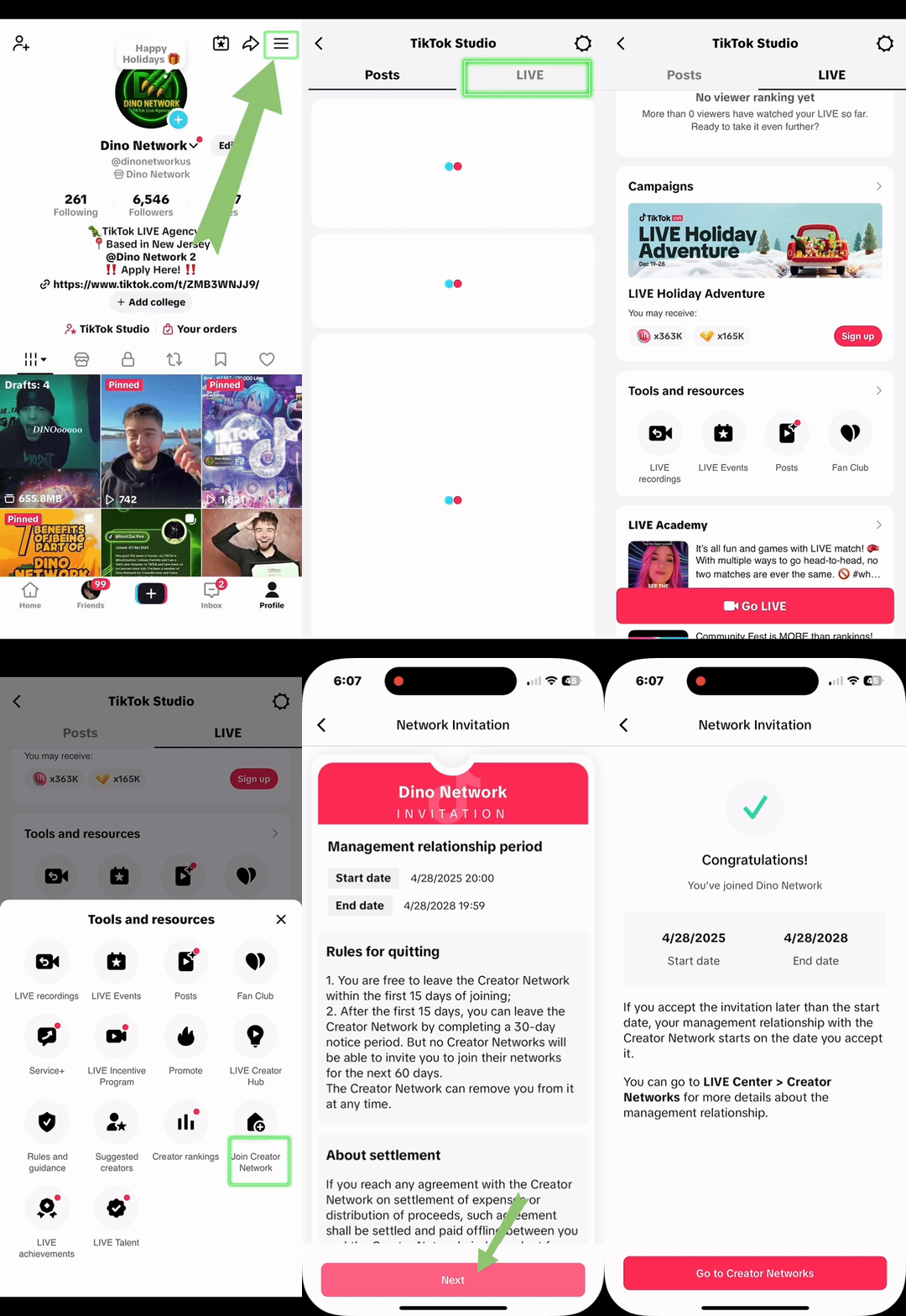
Tutorial preview from TikTok app.
Follow these steps in your TikTok app
Just 8 simple steps and you'll be part of Dino in under a minute!
Step 1
Launch the TikTok app on your mobile device.
Step 2
Look for the hamburger menu icon in the top right on your profile.
Step 3
Find and select 'TikTok Studio' from the menu options.
Step 4
Navigate to the LIVE Center section in TikTok Studio.
Step 5
Look for and select 'Join Creator Network' option.
Step 6
Click on the 'How to Join' button or link.
Step 7
Your Dino agency invitation will be displayed.
Step 8
Click the Accept button to officially join Dino!
Once you tap Accept, you'll officially be part of the Dino team and ready to start your TikTok LIVE journey!