
Step 1
Go to your TikTok Profile
Open TikTok and tap on your profile picture in the bottom right corner.
Invitation Code
Follow these quick steps in your TikTok app - it takes less than 10 seconds.
Follow along with this quick tutorial to find your TikTok invitation code in seconds.
Continue to step-by-step guide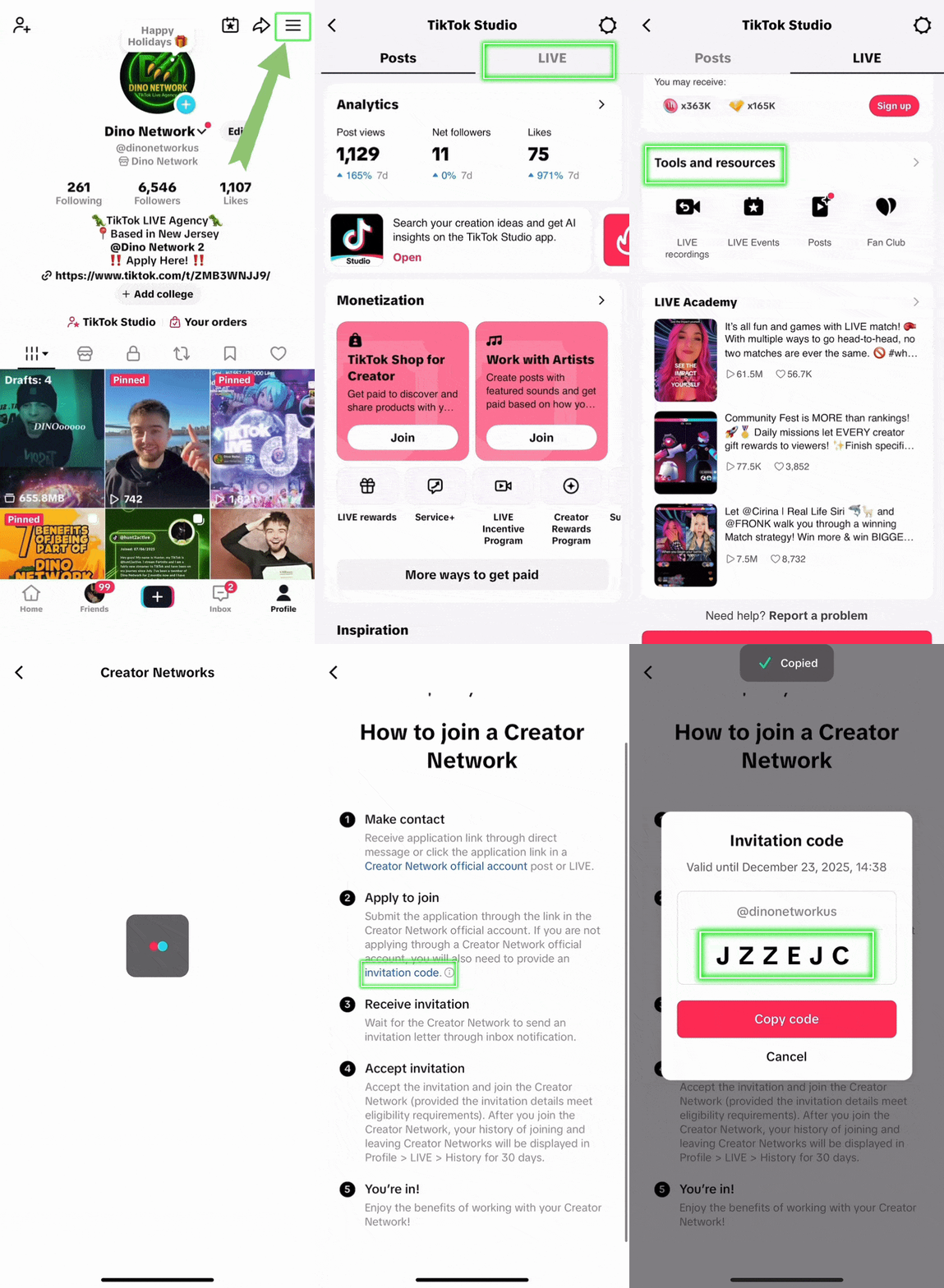
Tutorial preview from TikTok app.
Follow these steps in your TikTok app
Just 7 simple steps and you'll have your code in less than 10 seconds!
Step 1
Open TikTok and tap on your profile picture in the bottom right corner.
Step 2
Look for the hamburger menu icon in the top right or the little arrow.
Step 3
Find and tap on 'TikTok Studio' from the menu options.
Step 4
Navigate to the LIVE Center section in TikTok Studio.
Step 5
Look for and select 'Join Creator Network' option.
Step 6
Click on the 'How to Join' button or link.
Step 7
Your unique invitation code will be displayed right there!
Send it to us through any of the applications below.
near_meChoose your preferred method